
System Theme Settings Have Changed – cannot sync QuickBooks because of popup dialog box
Problem:
Our inventory system is unable to sync orders to QuickBooks. The following message has popped up:
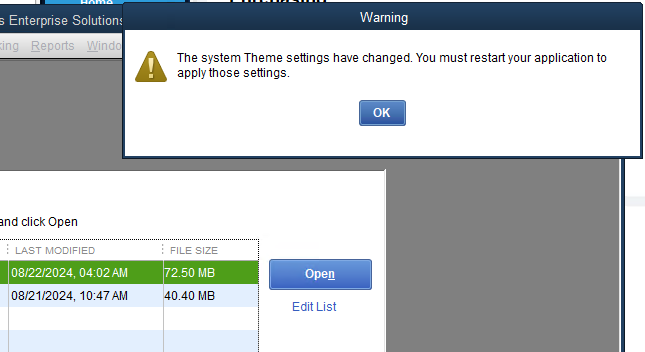
“Warning The system Theme settings have changed. Your must restart your application to apply those settings.”
Equipment:
- Windows 2022 Server Standard
- QuickBooks Enterprise 2023 Gold
Cause:
Remote Desktop Connection with different screen resolution.
There seems to be a pattern where the more often the sysadmin remotes into the server (where the QuickBooks file and our inventory system live), the more often we see this message.
Upon further investigation, I believe that the Remote Desktop connection is, in fact, the problem. The remote connection had a 1920×1080 screen resolution, which is not what the server spends most of its time on. This change in screen resolution would be the “system theme setting” that has changed.
Suggested Solution:
Turn off QuickBooks popups
- Log in to the company file as Admin
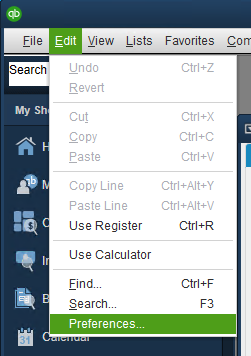
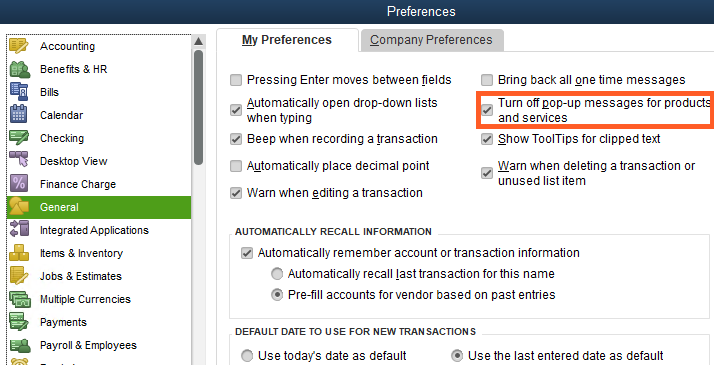
- Navigate to Edit > Preferences > General > My Preferences
- Mark the box to “Turn off pop-up messages for products and services”
Results:
QuickBooks support at Intuit has confirmed that this is the correct solution. However, results are mixed. This usually works, but not always. There have been a couple of times that we had to wait until QuickBooks released the next update for this solution to work as expected.
A note from East Texas Design: QuickBooks is one of the most popular accounting softwares for small and mid-size businesses. This has led to several integration opportunities and helpful resources to turn to when you run into problems!
However, I have encountered many bugs when companies try to use QuickBooks Enterprise Desktop outside its originally intended workflow. Many calls have ended with support teams blaming changes in QuickBooks Desktop when their integration fails, and suggesting the client switch to QuickBooks Online versions. … Just something to keep in mind as you choose your accounting software.
